Technical Documentation
Laboratory Solution Documentation
Architecture and implementation documentation for the Enterprise Laboratory Request Management solution, covering the application, Dataverse data model, automated workflow, business process stages, SharePoint/SPFx dashboard, security, and deployment considerations.
1. Solution Architecture
The solution separates the user experience, enterprise data, automation, collaboration, and reporting layers so each component can evolve without tightly coupling the entire application.
 Power Apps
 Dataverse
 Power Automate
 SharePoint / SPFx
 Power BI
Application layer: A model-driven Power App provides structured forms, views, navigation, and process stages. Data layer: Dataverse stores requests and related reference information. Automation layer: Power Automate handles approval routing, notifications, status changes, and assignments. Collaboration layer: SharePoint supports related documentation and an SPFx dashboard. Analytics layer: Power BI provides a path for deeper operational reporting.
2. Dataverse Data Model
The data model centers on the Laboratory Request record and uses related reference tables to keep request data structured and reusable.
| Table / Component | Purpose | Example Information |
|---|---|---|
| Laboratory Request | Main transactional record | Request number, request name, status, priority, confidentiality, request dates, approval data, assignment, technician work, completion. |
| Department | Organizational reference | Department code, description, department manager, active flag. |
| Laboratory Location | Laboratory/location reference | Location and location type information used by requests. |
| Laboratory Request Type | Request classification | Structured request categories used instead of free-text classification. |
| Global Choices | Consistent controlled values | Status, Priority, Approval Outcome, Confidentiality Level, Laboratory Work Category. |
Relationship strategy
Lookup relationships connect Laboratory Request to Department, Laboratory Location, and Laboratory Request Type. This reduces duplicate text, improves data quality, and supports consistent filtering and reporting.
3. Business Process & Workflow Automation
The business process flow provides six visible stages: Request Submission / Request Details, Manager Approval, Laboratory Review, Assignment, Technician Work / Work In Progress, and Completion. Power Automate performs the asynchronous workflow behind those stages.
- Submission initiates the approval process.
- Manager approval captures the approver, outcome, date, and comments.
- Approved requests continue to laboratory/supervisor review; rejected requests stop or move to a rejected state.
- Assignment identifies the technician and records assignment timing.
- Notifications inform the appropriate users when work is assigned or status changes.
- Technician work is tracked through start, progress, notes, and completion information.
- Completion updates the request status and retains an auditable history of the process data.
4. Laboratory Operations SPFx Dashboard
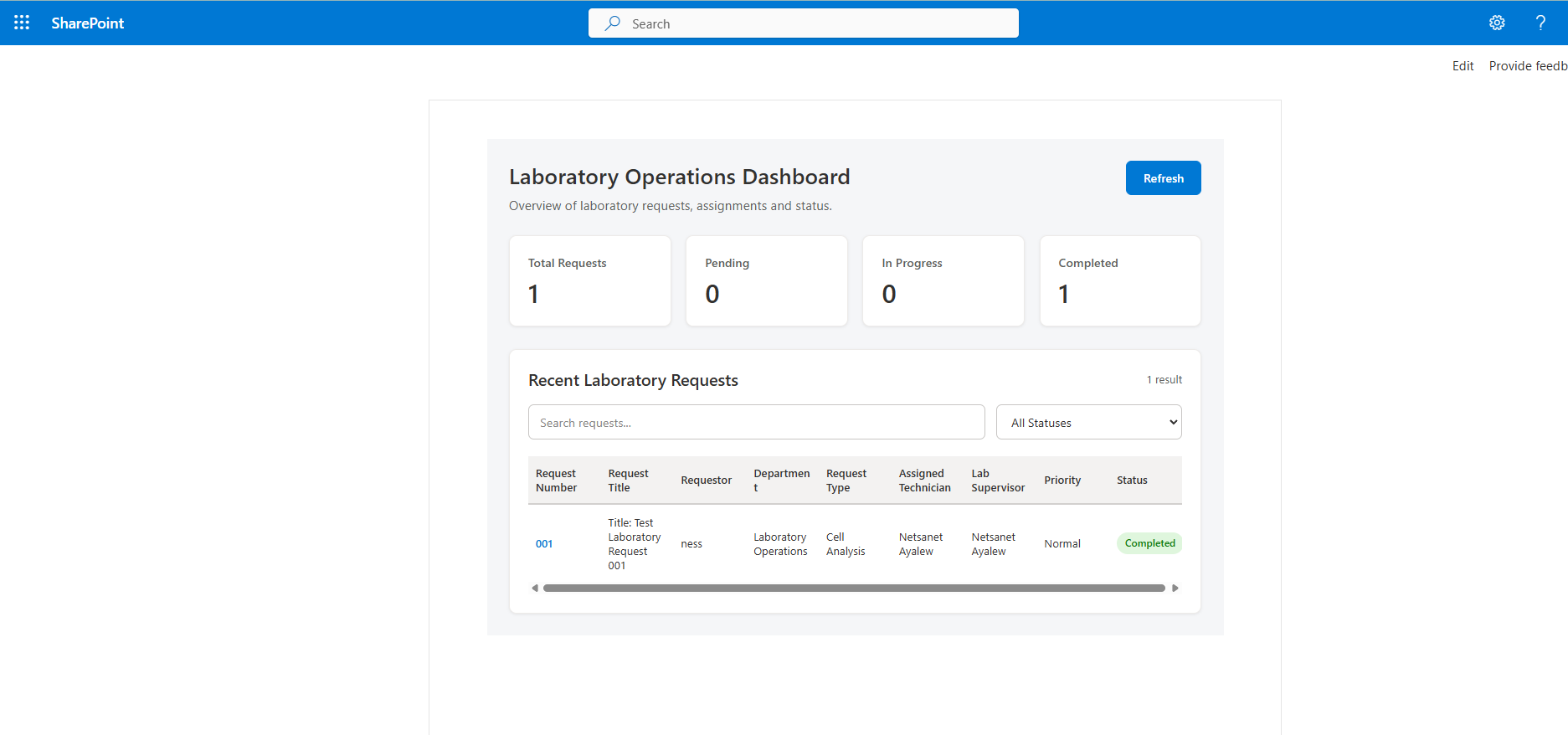
SharePoint operational experience
A custom SharePoint Framework dashboard provides a focused operational view of laboratory requests. The dashboard was developed with React and TypeScript and displays total, pending, in-progress, and completed request indicators plus searchable and filterable request data.
5. Security & Role-Based Access
The solution is designed around role-specific responsibilities rather than giving every user the same access. Requesters create and monitor requests; managers review business approvals; laboratory supervisors perform laboratory review and assignment; technicians execute assigned work; administrative roles maintain configuration and support.
Confidentiality values and Dataverse/SharePoint permissions provide a foundation for restricting sensitive records and documents. Production implementations should validate least-privilege access, environment security groups, connection ownership, service accounts where appropriate, and sharing of Power Apps, flows, SharePoint sites, and Power BI content.
6. Implementation & Deployment Approach
- Gather requirements and map the existing laboratory request lifecycle.
- Design the Dataverse schema, reference tables, relationships, and controlled choices.
- Build the model-driven application, forms, views, and business process flow.
- Implement Power Automate approval, notification, assignment, and status automation.
- Develop and test the SharePoint/SPFx operational dashboard.
- Validate security roles and user access for each business persona.
- Perform functional, workflow, permission, and user-acceptance testing.
- Package Power Platform components in solutions and promote changes through controlled environments.
- Document configuration, deployment dependencies, support procedures, and known limitations.